
Tessarium
A Pyxel Edit alternative for tile-first pixel art. Made by a game developer, for game developers.
If you're used to using Pyxel Edit for linked tiles, draw a tile once, place it everywhere, edit it later and watch every copy update, you already understand the workflow Tessarium is built around. This page covers what carries over, and the tools and features that have been added on top of it.
Tessarium opens .pyxel files directly, so you can try it against work you have
already made rather than starting from an empty canvas.
Why an alternative was needed
Pyxel Edit stopped being actively developed years ago, and was broken for a long time on the latest macOS and Apple Silicon. It remains a good tool and plenty of people still use it happily. But eight years was a long time to wait on a bug fix and new features, and its forum is now a read-only archive. While great, there was also a lot of missing functionality, and I needed a tool better suited to my workflow.
The awkward part was that the usual recommendations did not replace it. Aseprite is a sprite and animation editor, excellent at that job, but tile reuse is not what it is organised around. Tiled assembles maps from tilesets made elsewhere and cannot draw a pixel. Most tools listed as Pyxel Edit alternatives are general pixel editors that do not do linked tiles at all.
As a developer who heavily used PyxelEdit, when it broke I couldn't find a suitable alternative. Tessarium was built for the same job Pyxel Edit was, tile-based scenes where the tiles and the artwork are edited in the same place, and then kept going from there. All the things that frustrated me, from no Rulers and snapping all the way to having to use multiple file menu selections for a task that one click could do. Then it became 'what dream features can I add?' to improve my GB Studio and retro pixel art workflow.
Side by side
| Pyxel Edit | Tessarium | |
|---|---|---|
| Latest release | Occasional patches, no longer actively developed | 1.8.0 (2026), updated regularly |
| Linked tile editing | Yes | Yes |
| Draw straight onto the map | Yes | Yes |
| Tilesets shared between project files | — | Link, pull and push across levels |
| One-click tile cleanup | — | Reidentify, merge duplicates, remove unused |
| Terrain and autotiling | — | Terrain Brush, Box, Line and Fill |
| Prefabs | — | Save tile groups and reuse across projects |
| Rulers, guides and snapping | — | Rulers, guides, pixel and iso grids, tile-lock snapping |
| Text and fonts | — | Any system font, plus GB Studio bitmap fonts |
| Art tools | — | Gradient fills, tile fills, lighting, iso skew and more |
| Hardware limit guidance | — | Tile counts, colours-per-tile, usage heat maps |
| GB Studio support | — | Fonts, border boxes, scene size checks |
| Platforms | Windows, macOS | Windows, macOS, Linux, browser |
| Opens .pyxel files | Yes | Yes |
| Price | One-time purchase | Completely free, all features included |
Both tools share the same core idea. Almost everything below is about what happens once a scene gets large, or a project grows past a single file. In addition, for developing for retro hardware, guidance, dimensions, colour limits etc have been added.
What carries over
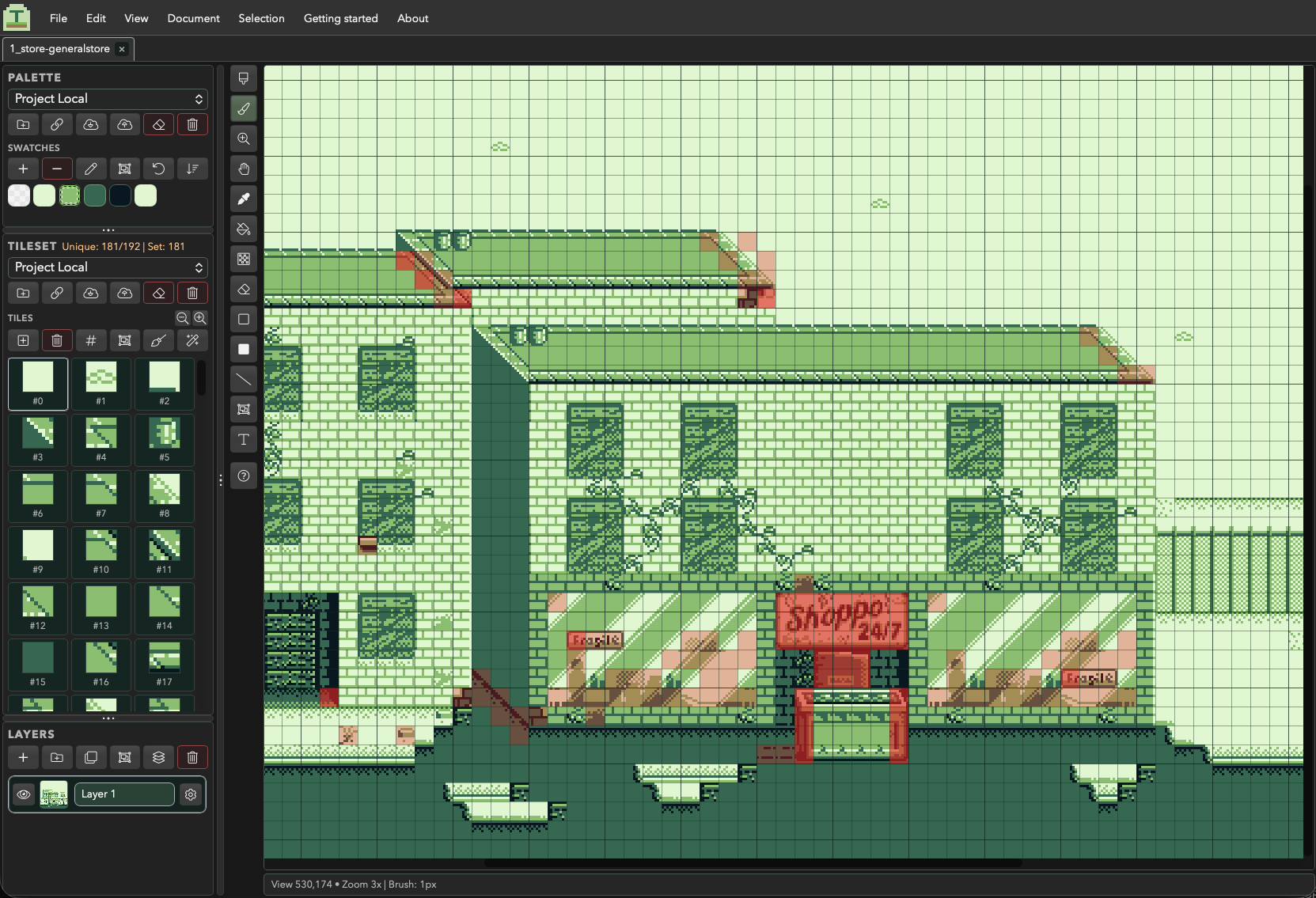
The habits transfer. You draw directly on the canvas rather than into a separate tile editor, turn useful artwork into a reusable tile, and stamp it around the scene. Editing that tile afterwards updates every placement at once. Single and multi-tile stamps, tile pickup with right-click, and a tileset panel you paint into all work the way you would expect.
The time-savers
One-click tile cleanup
The tedious part of tile work is housekeeping, and Tessarium automates all of it. Reidentify rebuilds tile indices across a layer, Merge Duplicates finds tiles that are pixel-identical and collapses them into one, and Remove Unused strips tiles nothing references any more. Optimise runs all three in a single click. On a scene you have been iterating on for a week, that alone can pull a tileset back under budget in seconds.
Rulers, guides and snapping
Rulers and draggable guides, a pixel grid, an isometric grid overlay, and a global Tile-lock mode that snaps every grid-aware tool to whole tiles, with a modifier to drop back to free pixels whenever you need it. Marquee selection works pixel-precise or tile-snapped, and shape tools snap to straight, diagonal and 2:1 isometric angles.
Real text, straight onto the canvas
Type directly into a scene using any font installed on your machine, TrueType or OpenType, at any size, with control over letter and word spacing. Tessarium renders the glyphs into palette colours rather than pasting flat shapes, and it can map antialiased edges onto your palette's own shade ramp, so text sits inside your colour limits instead of breaking them. For hard-edged retro lettering, turn antialiasing off and it stays crisp.
It also loads GB Studio bitmap font PNGs. Point it at the font your game actually uses and your mockups match the real thing, character for character, and multi-colour fonts keep their own colours rather than being flattened to one shade. Fonts you use often can be saved into Tessarium so they are there next time. The GB Sans 8-bit family is included, in regular, italic, small caps and mini.
Text commits down into layer pixels, so once it is placed it is just artwork, you can paint over it, select it, or convert it into tiles like anything else.
Tilesets that live outside a single file
A tileset can be linked to several level files at once. Pull the shared set into a new level, push changes back when you improve a tile, and every level using it stays in sync. This is the feature that matters most once a project is more than one scene. Palettes work the same way.
Terrain tools
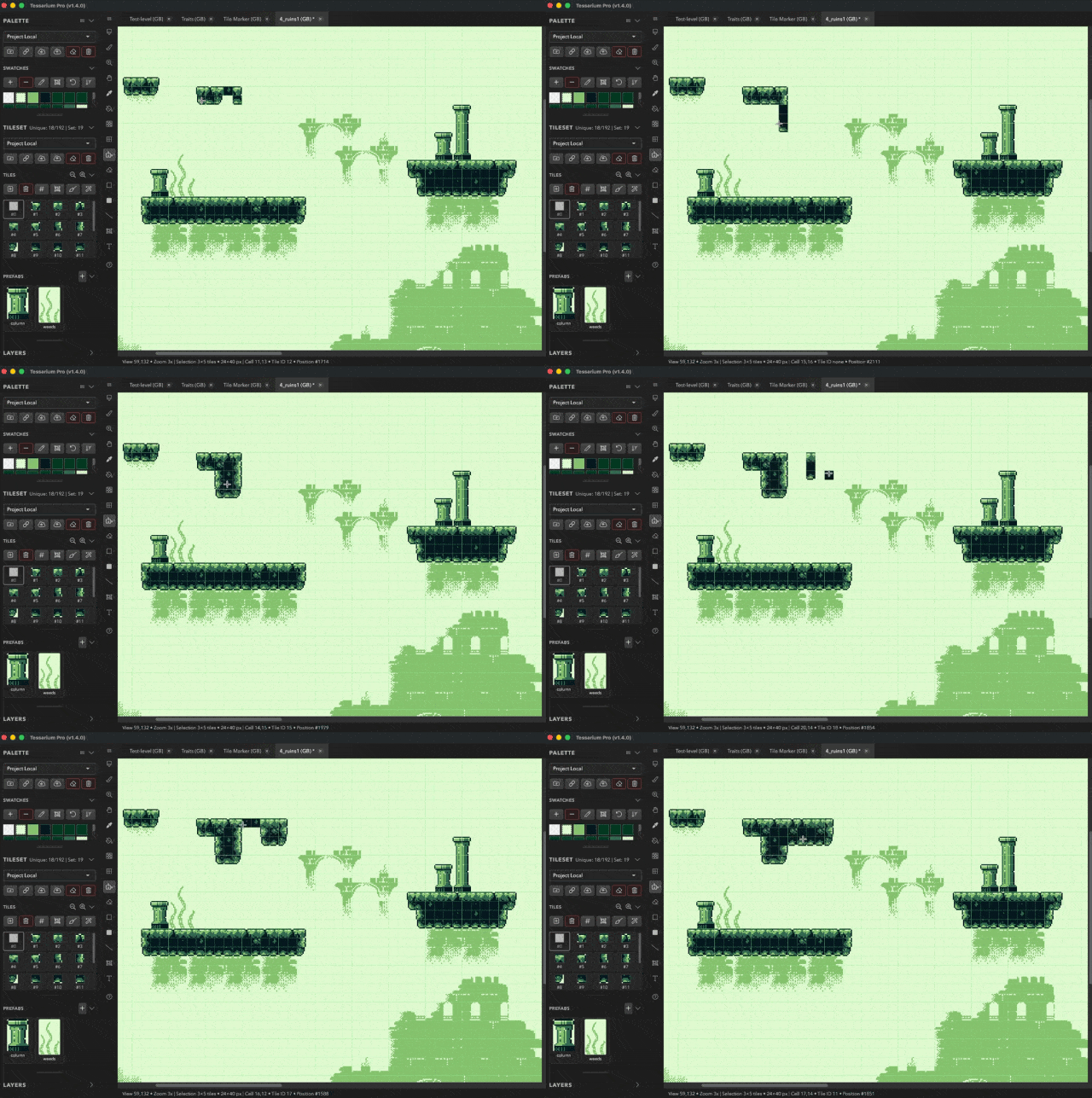
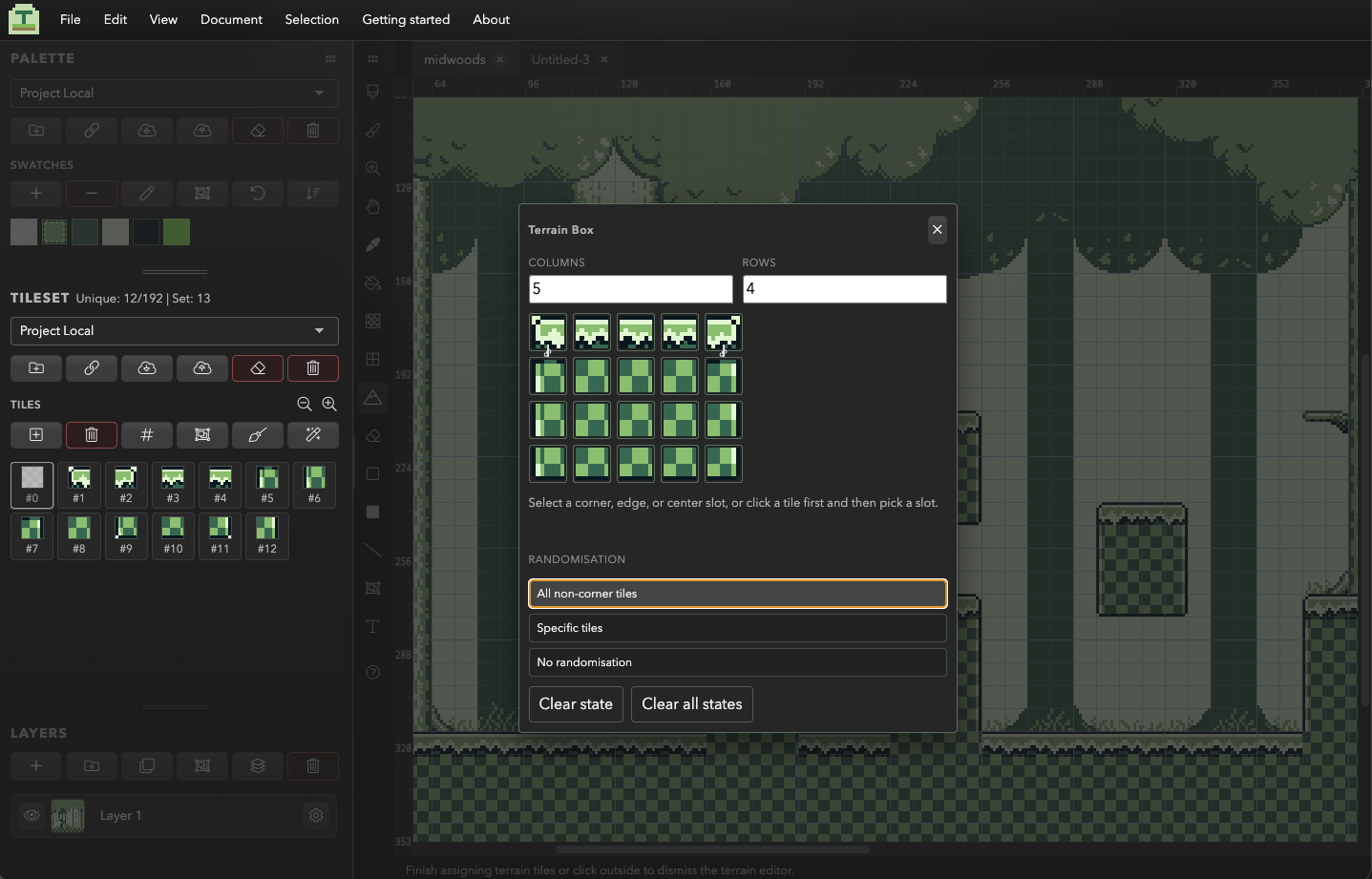
Set up corner, edge and interior tiles once, then paint terrain freehand and let Tessarium pick the right tile for each cell based on its neighbours. Chain tiles that must sit next to each other, and let it shuffle variants so terrain does not visibly repeat. Terrain Box, Line and Fill cover rectangles, oriented edge strips and large textured areas.
Prefabs
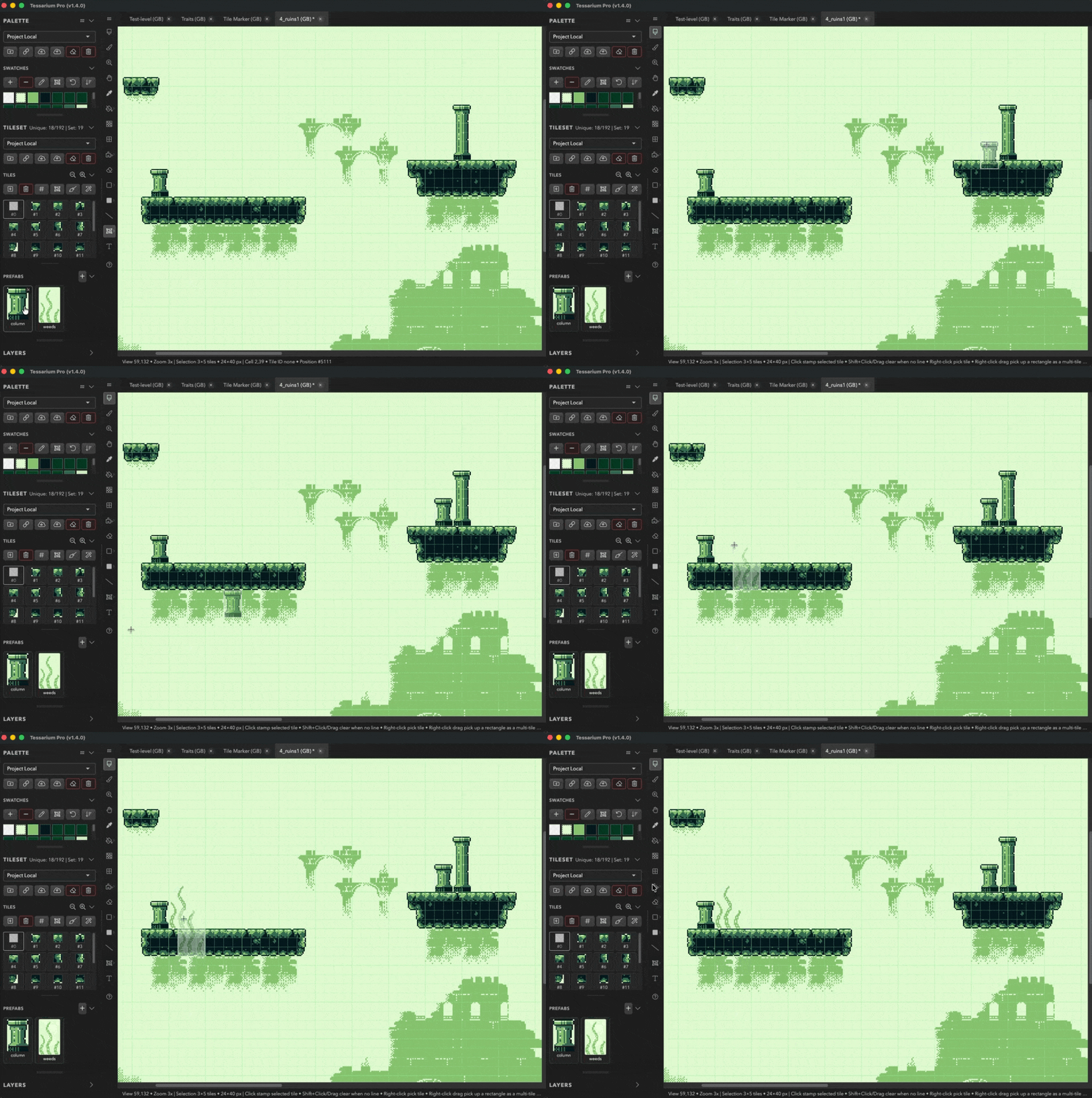
Save any selection, a house, a tree, a doorway, as a named prefab, then drop it into any project as a multi-tile stamp. Prefabs carry their own tile data, so they work across files.
Guidance for retro hardware
Pick a platform, Game Boy, Game Boy Color, NES, SNES, Master System, Mega Drive, C64, or your own custom limits, and Tessarium loads that target's tile budget, colour rules and palette swatches. Two overlays then keep you honest while you work:
- The tile usage heat map shades cells by how often their tile is reused, so single-use tiles glow red. It shows you exactly which part of a scene is eating your unique tile budget, and it is usually somewhere you would not have guessed.
- The colour safety overlay flags any tile exceeding the platform's colours-per-tile limit, the mistake that is invisible on screen and only surfaces when the art reaches the hardware.
A running unique-tile count sits beside the tileset, so you are never guessing how close to the ceiling you are. Catching this while drawing is far cheaper than redrawing a finished scene.
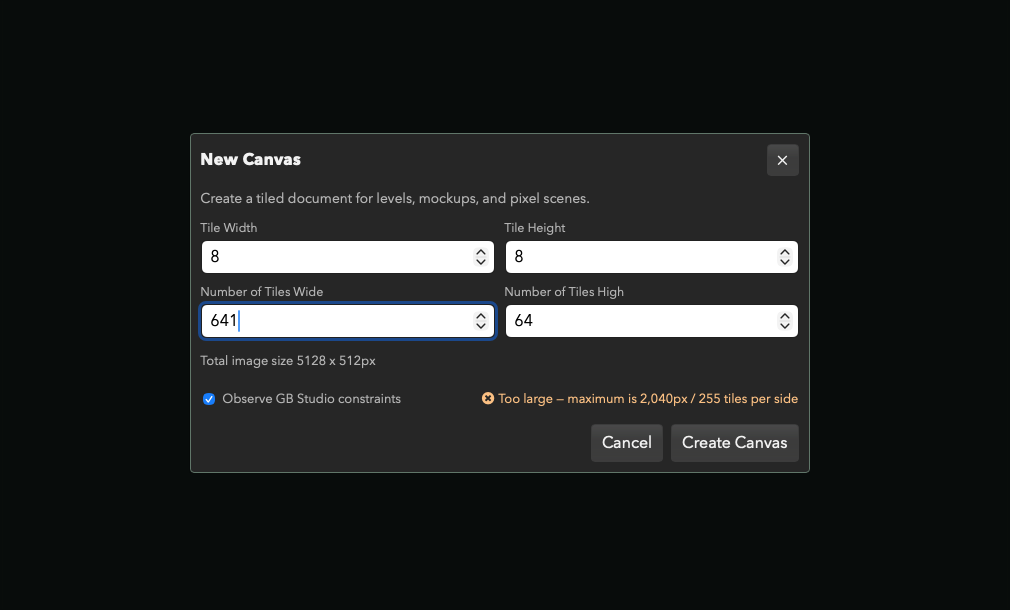
The same guidance applies before you have drawn anything. Set up a new canvas and Tessarium checks it against the target's scene limits as you type, so you cannot accidentally start a GB Studio background at a size that will not compile.
A browser version
Tessarium runs in the browser with nothing to install, which is the easiest way to see whether the workflow suits you before downloading anything.
And the rest
Additional features
Editing
- Precise tile edit mode, focus a tile from the tileset and paint into it, with the canvas updating live
- Layers with visibility, opacity, blend modes and merge actions
- Marquee and magic wand selection, pixel-precise or tile-snapped
- Free transform, rotate, scale, flip and skew
- Selection › Skew, Warp and Puppet Warp with direct canvas controls and up to 32 pins for Puppet Warp; Enter applies and Escape cancels
- Mirror draw for symmetrical artwork
- Quick fills, solid, border, and gradient dither, with gap tolerance
- GB Studio UI border boxes, import your dialogue frames and draw panels at any size
- Isometric grid, guidelines and diamond shapes
- Resize the canvas from any anchor, or crop straight to a selection
Working on real projects
- Multiple documents in tabs
- Split view, edit one scene with another open beside it for reference
- Rolling backups of every project file you save over
- Undo and redo that keep your zoom and pan position
- Re-orderable UI with pop-out and dockable panels
- Palette presets you can save, load and share between projects
- Tile and swatch Lock–Unlock menus with padlock badges; protection is saved with your project, and locking or unlocking can be undone
- Open a PNG, edit it, and save straight back over the same file
- Imports PNG,
.pyxel, Aseprite and Tiled files - Exports PNG, JPG, WEBP and Tiled
.tmjmaps
Tessarium is completely free, with every feature included in one version, including Add Outline, Replace Colour, Lighting fill, Iso Skew and themes.
Where Tessarium will not suit you
Potentially saving you a download:
- It is a level editor, not a general sprite tool. It is organised around tiles, layers and scenes. If your work is single sprites, icons or character animation, a dedicated sprite editor is the better fit, and the two sit together fine, since Tessarium imports from Aseprite, Aseprite is great for animation and sprites, but like Tiled, it just didn't offer me what I needed for level design and background art creation. Sprites can still be created, opened and edited, but I'm not trying to replace Aseprite as an animation editor.
- Tile sizes are 8×8 or 16×16. Suitable for retro console work; restrictive if you wanted arbitrary tile dimensions.
- The desktop builds are not code-signed yet. macOS and Windows will show a warning the first time you open them. There are instructions below.
Questions
Common questions
Can Tessarium open my existing .pyxel files?
Yes. Use File › Import and choose your .pyxel file.
Tessarium also imports PNG, Aseprite .ase / .aseprite, and Tiled
maps and tilesets.
Is Pyxel Edit still being updated?
Not actively. It has had occasional fixes, including a patch for Apple Silicon, and it is still sold, but new features have not arrived in years and its forum is now archived.
Is Tessarium free?
Yes. Tessarium is completely free, with every feature included in one version. Linked tiles, shared tilesets, terrain tools, prefabs, tile optimisation, layers, imports and exports, Add Outline, Replace Colour, Lighting fill, Iso Skew and themes are all included.
Does it work with GB Studio?
Yes. Tessarium checks scene dimensions against GB Studio's limits, tracks the 192 unique background tile budget, colors per tile, imports GB Studio fonts and dialogue frames, and exports GB Studio-friendly PNG backgrounds. Opening a PNG and saving it writes straight back over the same file, so it drops into an existing assets folder without extra steps.
What about Aseprite and Tiled?
Aseprite solves different problems and works well alongside Tessarium with its great animation features. Tiled, it can both replace it as an all from one Tessarium or import and export with tiled formats.
The macOS app will not open
The builds are not yet notarised (if there's enough interest I'll fork out for an Apple developer license), so macOS shows a warning on first launch. Running this in Terminal clears it:
xattr -cr /Applications/Tessarium.appOn older macOS versions, right-clicking the app and choosing Open also works.
Try it against your own work
The browser version needs no install and no account. Import a .pyxel file you
already have, edit a tile, and see whether the workflow feels right.
Coming from somewhere else too? There is a page for people building levels in Tiled, and one on tile-based level design if you have only ever drawn levels as a single image.